
eLife Inc.'s ai.elife.co.jp Security Hygiene: Response Headers, DMARC, security.txt and Cookies Before Consent
This post is part of the audit in the special edition I prepared for eLife Inc. (株式会社イーライフ). It is written from my own field, cloud and infrastructure engineering, and it describes only what any visitor's browser or a public DNS lookup shows on ai.elife.co.jp. Each item is a hygiene observation with a stated confidence. None of them says that anything has gone wrong, none names an individual, and I make no legal assessment. It is offered without any condition.
Other posts in this series: the special edition overview, mobile speed, cookie banner and web fonts, delivery path, vendors and public CVE records, the -96% claim and a 90-day roadmap and a separate matter. 日本語: セキュリティの基本事項.
The answer in brief
Seen from outside, the security basics are mostly sound: HTTPS is required, the certificate is current, and the connection is modern. What remains are settings. Three of six common response headers were not observed on the page response. A fourth is set to share more than the browser default. The email-authentication policy is still in monitoring mode. No security contact file is published. Analytics and advertising cookies were already present before any choice on the cookie banner in my capture. Most of these are low-effort fixes.
What I did, and what I did not do
On 26 November 2026, between 10:58 and 11:00 (UTC+7), I loaded the home page of ai.elife.co.jp once in a desktop browser and once with mobile emulation, each in a fresh, logged-out profile, and the eLife corporate home page once. In Chrome DevTools I read the response headers, the cookies and the list of network requests. I made one ordinary request for the standard security contact file location, /.well-known/security.txt, and read the certificate presented during that request. I looked up public DNS records for elife.co.jp and ai.elife.co.jp.
Nothing else was requested from eLife systems: no scanning tools, no requests to guessed paths, no sign-in, no form submission and no automated testing service. I did not press any button on the cookie banner, so the state after a choice was not observed. I was outside Japan, so anything that depends on the visitor's location may differ for a visitor in Japan.
Six response headers on the page
| Header | Observed on the page response | What it suggests |
|---|---|---|
| Strict-Transport-Security | max-age=31536000 (one year), no includeSubDomains or preload | HTTPS is required for this host. Whether other subdomains match is not visible. |
| Content-Security-Policy | upgrade-insecure-requests only | Used as a transport setting, not as a list of allowed sources. |
| X-Content-Type-Options | not observed | The security.txt response did carry nosniff, so it looks like a per-response default. |
| X-Frame-Options or frame-ancestors | not observed | The page gives other sites no instruction on whether they may frame it. |
| Referrer-Policy | no-referrer-when-downgrade | Sends the full page address, query string included, to other sites over HTTPS. |
| Permissions-Policy | not observed | The page embeds two frames, and nothing declares which browser features they may use. |
The values were the same on the desktop and mobile loads. On the corporate home page, captured at 10:59 UTC+7, none of the six headers was observed. Its one cookie was set with Secure, HttpOnly and SameSite=Lax, which is a sound setting. The corporate site runs on a different delivery stack, which suggests the two sites' settings are managed separately.
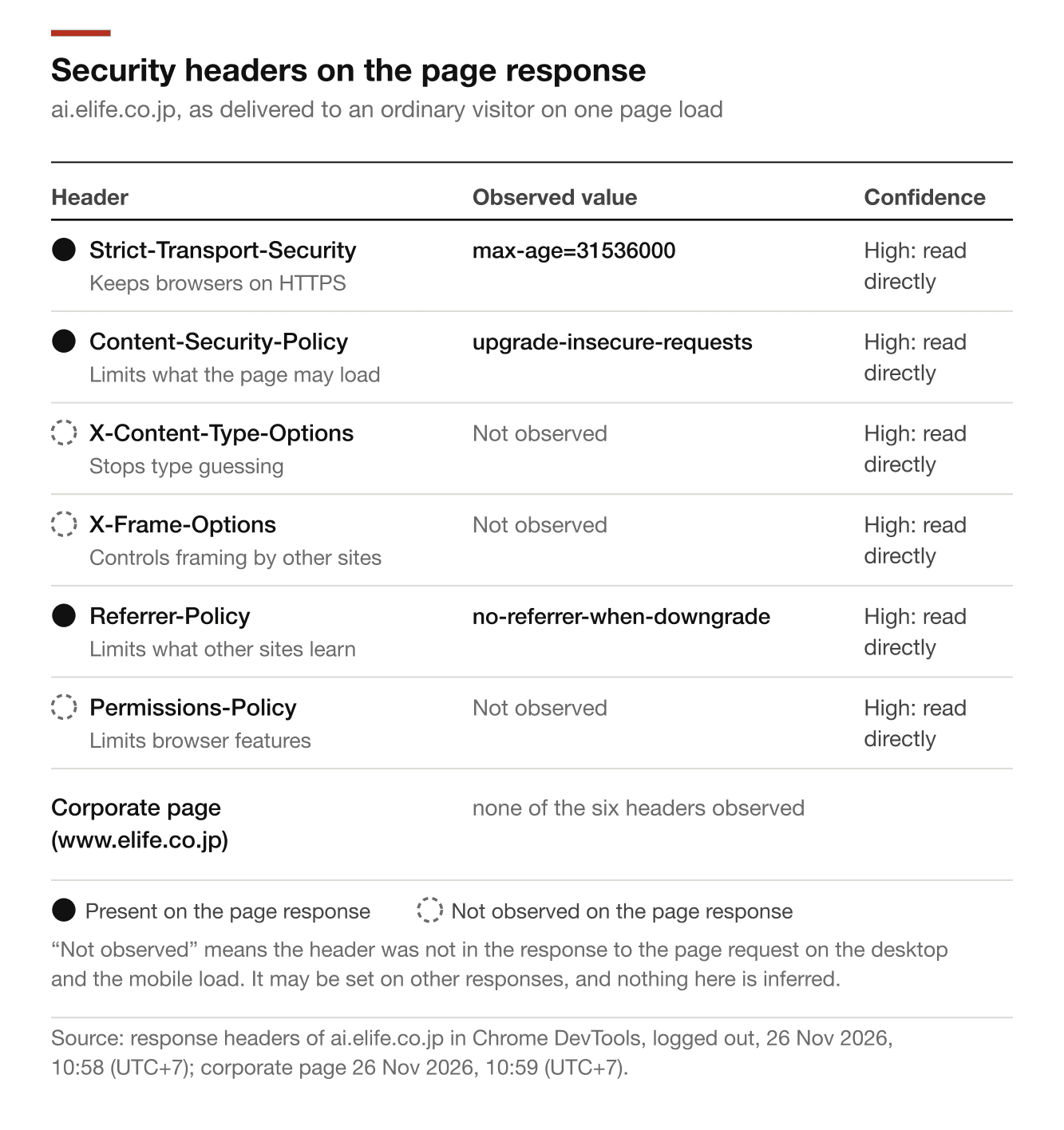
Figure. Six response headers of the product site, with the corporate site for comparison. Source: Chrome DevTools, 26 November 2026.
Improvement, within 30 days. Check the domain-level security settings of the content system, or ask its provider, for a site-wide X-Content-Type-Options: nosniff. If embedding is not needed, send X-Frame-Options: SAMEORIGIN or the CSP directive frame-ancestors 'self', and name partners in frame-ancestors if they embed the page. Change Referrer-Policy to strict-origin-when-cross-origin unless a named integration needs more. Send a short Permissions-Policy that switches off features the page does not use. Apply the same baseline to the corporate site, where a response-headers policy at the CDN can add it in one place. Decide the HSTS scope on purpose: once every eLife subdomain serves HTTPS, consider includeSubDomains, and consider preload only after checking all of them. Effort: low. Confidence: high on the observed values.
Content-Security-Policy, within 90 days. With 23 third-party hosts in one load, a full policy is real work, not a one-line change. Draft one from a tag inventory, run it first in report-only mode, fix what it reports, then switch it to blocking. Effort: medium.
Analytics and advertising cookies were present before any banner choice
On the first desktop load, with the cookie banner still showing and unanswered, seven cookies had been set by scripts on the page. Three came from Google's analytics and advertising tags: _ga, _ga_HTWSN04GRF and _gcl_au. Four came from HubSpot's analytics: __hstc, hubspotutk, __hssrc and __hssc. Two more were set by the page response itself for Cloudflare's bot management, __cf_bm and _cfuvid, and both carried HttpOnly, Secure and SameSite=None, which suits their purpose. The mobile load showed the same seven script-set names. In the same load, requests went to Google Analytics, to Google's advertising hosts and to HubSpot's tracking host before any choice was made.
A page cannot read whether its script-set cookies are Secure or SameSite, so I did not observe those attributes. This suggests that, for a visitor in my location at least, analytics and advertising tags do not wait for the banner. I make no legal assessment of that.
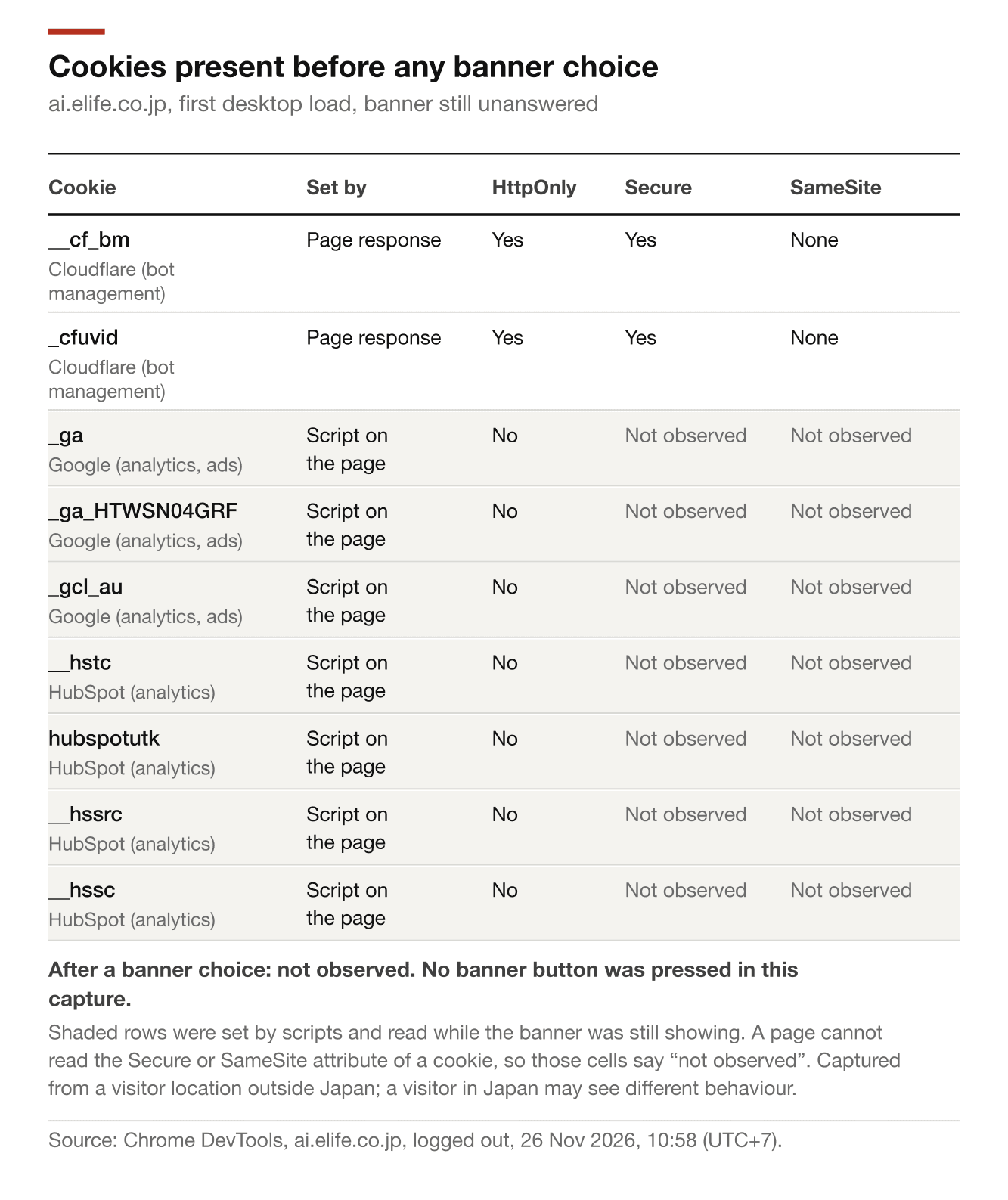
Figure. Cookies on the first desktop load, before any choice on the banner. Source: Chrome DevTools, 26 November 2026.
Question for the product. For a visitor in Japan who presses 「拒否」 (reject), which of these cookies remain and which requests stop? Is the banner configured differently by visitor location, and is that what eLife intends?
Improvement, within 60 days. In a fresh browser on a Japanese connection, record which cookies and requests exist before a choice and after each of the three controls. Then make analytics and advertising tags wait for the choice wherever the banner asks for one. Effort: medium. Confidence: high that these cookies and requests were present before a choice in this capture, and low on the behaviour for a visitor in Japan, which I did not observe.
One page load depends on 23 third-party hosts
One desktop load contacted 23 hosts other than ai.elife.co.jp. By purpose, as far as host names show it: nine belong to the content system and site platform, one to the cookie banner, two to web fonts, one to the product interface, one to the tag manager, four to analytics and tracking, and five to advertising. What the page does therefore depends on code from several vendors, each of which can change without a release by eLife. None of the 16 external scripts or 17 stylesheets in the page carried an integrity attribute. That is common and often reasonable, because tag-manager and content-system scripts change often and make fixed hashes impractical. It matters most for fixed, versioned files loaded from another host.
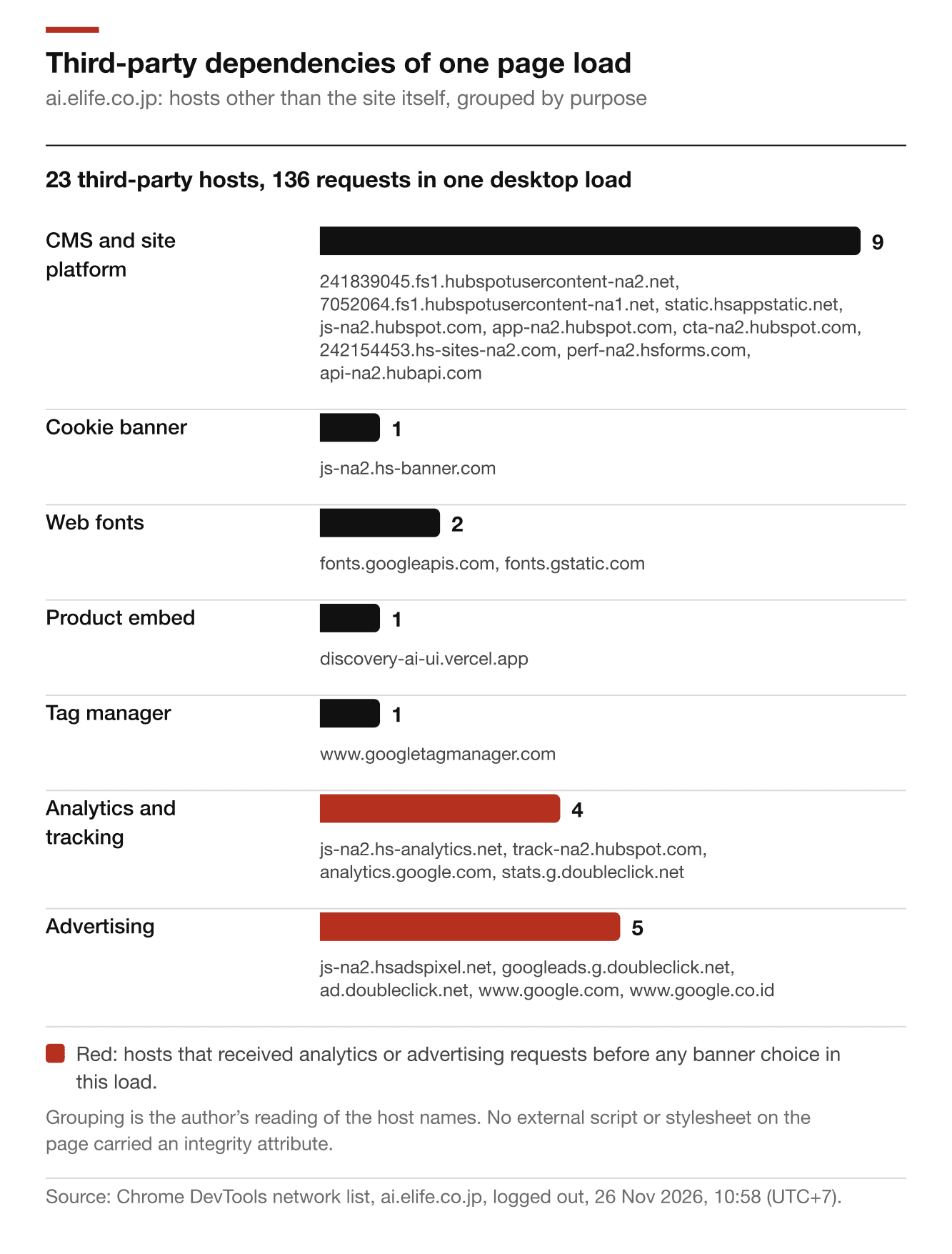
Figure. Hosts other than the site itself, grouped by purpose. Source: Chrome DevTools, 26 November 2026.
Improvement, within 60 to 90 days. Give one named person ownership of tags and third-party services, consolidate overlapping tags and defer the ones the first screen does not need. Add integrity attributes to versioned third-party files where the provider supports it, and rely on the Content-Security-Policy for the rest. Effort: medium. Confidence: high on the hosts listed, medium on the grouping, which is my reading of host names.
The certificate, SPF, DMARC and the security contact file
Certificate. The certificate presented during my single request was issued by Google Trust Services (WE1), valid from 5 October 2026 to 3 January 2027, with TLS 1.3 and a name matching ai.elife.co.jp. A window of about three months is typical of automatic renewal. No change is needed. Add certificate expiry to a monitoring baseline so a warning reaches a person, not a visitor.
SPF. The SPF record for elife.co.jp lists two IP addresses, four included services and one named mail gateway, and ends in ~all, a soft fail that asks receivers to accept but mark mail from senders not on the list. The included services are Google, HubSpot and two other email-delivery services. I did not look up the included records, so I cannot tell whether the total stays within SPF's limit of ten DNS lookups. DKIM selectors cannot be discovered from outside, so I did not check DKIM.
DMARC. The DMARC record for elife.co.jp reads p=none, sp=none, pct=100 and aspf=r, with aggregate reports sent to a third-party DMARC reporting service. That is monitoring mode: receivers are asked to report on mail that fails the checks, but not to act on it. Requesting aggregate reports is the right first step. I cannot see any reports, so I cannot tell how much legitimate mail would pass a stricter policy. No DMARC record answered for ai.elife.co.jp itself, so the parent domain's policy applies there.
Improvement, within 60 days. Confirm each sender and its purpose, remove retired ones and check the lookup count. Review the DMARC reports, fix any legitimate sender that fails, then move the policy to quarantine and later to reject, for subdomains too. Move SPF to -all once DMARC reports show all legitimate mail passing. Effort: medium. Confidence: high on the records, low on how ready the mail flows are, which only the reports show.
Security contact file. My single request for /.well-known/security.txt returned HTTP 404, so no file is published at that location. No security contact appears in the footer of the product site. The corporate site's footer links to an information security policy page, which I did not open. This suggests that someone outside eLife who notices a problem has no published route to the right person. I cannot tell whether such a route exists internally.
Improvement, within 30 days. Publish a short security.txt with a contact address, a preferred language and an expiry date, and link the existing security policy page from it. Effort: low. Confidence: high that the file was not published at the time of the request.
If eLife wishes, I would be glad to serve as a responsible-disclosure contact for observations of this kind, on whatever terms eLife prefers.
Where I may be wrong
- "Not observed" is narrow. It means the header was absent from the page response on both loads. It may be set on other responses, or by rules I cannot see.
- A policy may be deliberate. eLife may want its page to be embeddable by partners, or an integration may depend on full referrer addresses. I cannot tell from outside.
- One visit, from outside Japan, and I did not press any banner button. Behaviour after a choice, and for a visitor in Japan, is not observed.
- I requested only the standard security.txt location. A contact route may exist elsewhere on the site.
- I did not check SPF's lookup count or DKIM, and I cannot see DMARC reports.
- The site may have changed since 26 November 2026.
Where this sits in the roadmap
This post touches five of the audit's seventeen actions. Action 5 completes the basic headers on both sites and publishes a security contact file, low effort and medium effect, within 30 days. Action 7 builds the tag inventory and makes analytics and advertising tags follow the banner choice, medium effort and high effect, by day 60. Action 12 moves email authentication to a stricter DMARC policy, medium effort and medium effect, by day 60. Action 17 introduces a Content-Security-Policy in report-only mode, medium effort and medium effect, by day 90. Action 8 names one owner for tags and third-party services. The roadmap post lists all seventeen.
How to reach me
eLife Inc., or anyone acting for it, can reply to admin@infraloka.co.id or through the contact details on infraloka.co.id. If a finding here is wrong or out of date, I will correct it in writing. I would also be glad to answer questions about how any observation was made.
Right of reply and correction policy
A substantive response may be published alongside this article, subject to reasonable editing for privacy, safety and relevance. If reliable evidence shows a factual statement here is wrong, I will correct it promptly and note the change.
Published by Rahmat Wibowo at InfraLoka: infraloka.co.id
#ProfessionalBlacklist #eLifeInc #SpecialEdition #WebsiteAudit