
eLife Inc.'s DISCOVERY AI: The -96% Claim, a "Start Free" Button Beside an Intake-Suspended Notice, and a 17-Action 90-Day Roadmap
This post is part of the audit in the special edition I prepared for eLife Inc. (株式会社イーライフ). It looks at what the first screen of ai.elife.co.jp, the public site of eLife's DISCOVERY AI product, promises, what evidence sits beside the promise, and where the page says two things at once. It ends with the audit's roadmap. It names no individual, and I make no judgement on whether any figure is accurate. It is offered without any condition.
Other posts in this series: the special edition overview, mobile speed, cookie banner and web fonts, security headers, DMARC and cookies before consent, delivery path, vendors and public CVE records and a separate matter. 日本語: 「-96%」の数値と90日ロードマップ.
The answer in brief
The first screen shows large, attractive figures and gives almost no evidence for them. The same page offers a "Start free" button and carries a notice that new intake is suspended. The path from interest to sign-up needs one clear answer. All of this is writing and content work, not engineering, and the first two fixes can be done within 30 days.
The headline reductions are striking, and the page shows only "eLife's own survey" behind them
The first screen shows three figure tiles. One says tallying work becomes "almost zero" (集計作業ほぼゼロに): -96%, from 25.0 to 1.0 hours a month. The others show -81%, from 16.0 to 3.0 hours, and -91%, from 12.0 to 1.0 hours. Each tile carries a reference mark, and the note under the tiles reads 「※イーライフ独自調べ」 (eLife's own survey). No method, sample size, customer type or period appears next to the tiles. I captured this on 26 November 2026 at 10:03 (UTC+7).
For a large reduction to hold, several things must be true, and a skeptical customer or procurement team would ask about each:
- What was the baseline: one team's manual process, or an average across customers?
- How many customers or tasks were measured?
- Over what period, and before or after onboarding effort?
- Were the hours measured, or estimated by the users themselves?
- Would the figure survive a customer asking to see the underlying survey?
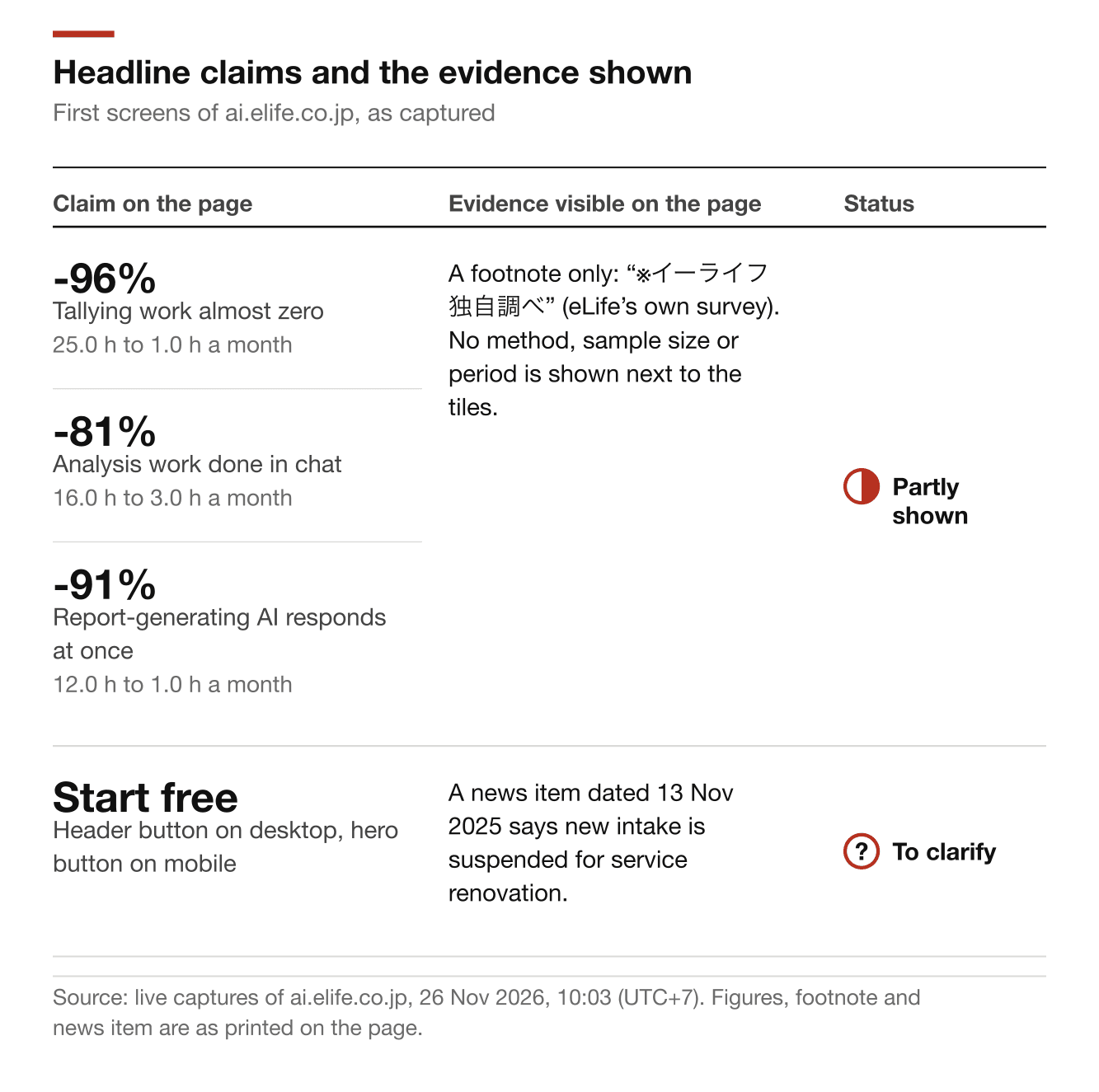
Figure. Headline claims on the first screen and the evidence visible beside them. Source: ai.elife.co.jp, Chrome DevTools, 26 November 2026.
Improvement, within 30 days. Put one line of method beside the tiles: who was measured, how many, over what period, and how hours were counted. Link to a short note or case study for readers who want more. If the basis cannot be shown, describe the figures as examples from early customers, not as general results.
Expected effect. The figures become more credible to exactly the buyers most likely to pay: data-literate marketers and procurement teams. Effort: low, mostly writing. Confidence: high that the method is not shown on the captured page. I make no judgement on whether the figures are accurate.
A "Start free" button and a notice that new intake is suspended appear on the same page
The header on desktop and the hero on mobile both offer a "Start free" button (無料で始める). Further down the same page, the News section shows one item, shown as dated 11/13/2025, which I read as 13 November 2025: 「サービス改修のため、新規受付を停止しております。」 (new intake is suspended for service renovation). Both were visible on the capture date. I did not press the button, so I do not know what a visitor meets next, and I do not assume the service is unavailable.
Question for the product. Which of the two is true today? If intake is open again, the notice is costing trust with every visitor who reads it. If intake is still suspended, what happens to the visitor who presses "Start free", and what impression of eLife do they leave with?
Improvement, within 30 days. Decide which message is current and make the page say one thing. If intake is open, retire the notice or close it with a date. If it is suspended, replace "Start free" with a clear alternative, such as a waiting list or a contact form, and say when intake is expected to reopen.
Expected effect. The page stops contradicting itself at the moment a visitor decides to act. Effort: low, a content change. Confidence: high that both elements were shown together. The current state of intake is for eLife to confirm.
The captured screens speak to a Japanese buyer only, and the path to pricing and trust is implicit
The captured first screens are in Japanese, and no language switch is visible in the desktop header, which offers pricing, features, FAQ, contact, login and "Start free". I did not capture the pricing page or the sign-up flow, so I make no observation about either.
Is DISCOVERY AI for Japanese brands only, or also for brands selling into or out of Japan? If the second, how does an overseas marketing lead, or a Japanese company's overseas office, evaluate it today? And for any buyer: what on the first screen tells them who stands behind the product, which customers use it, and how their data is handled?
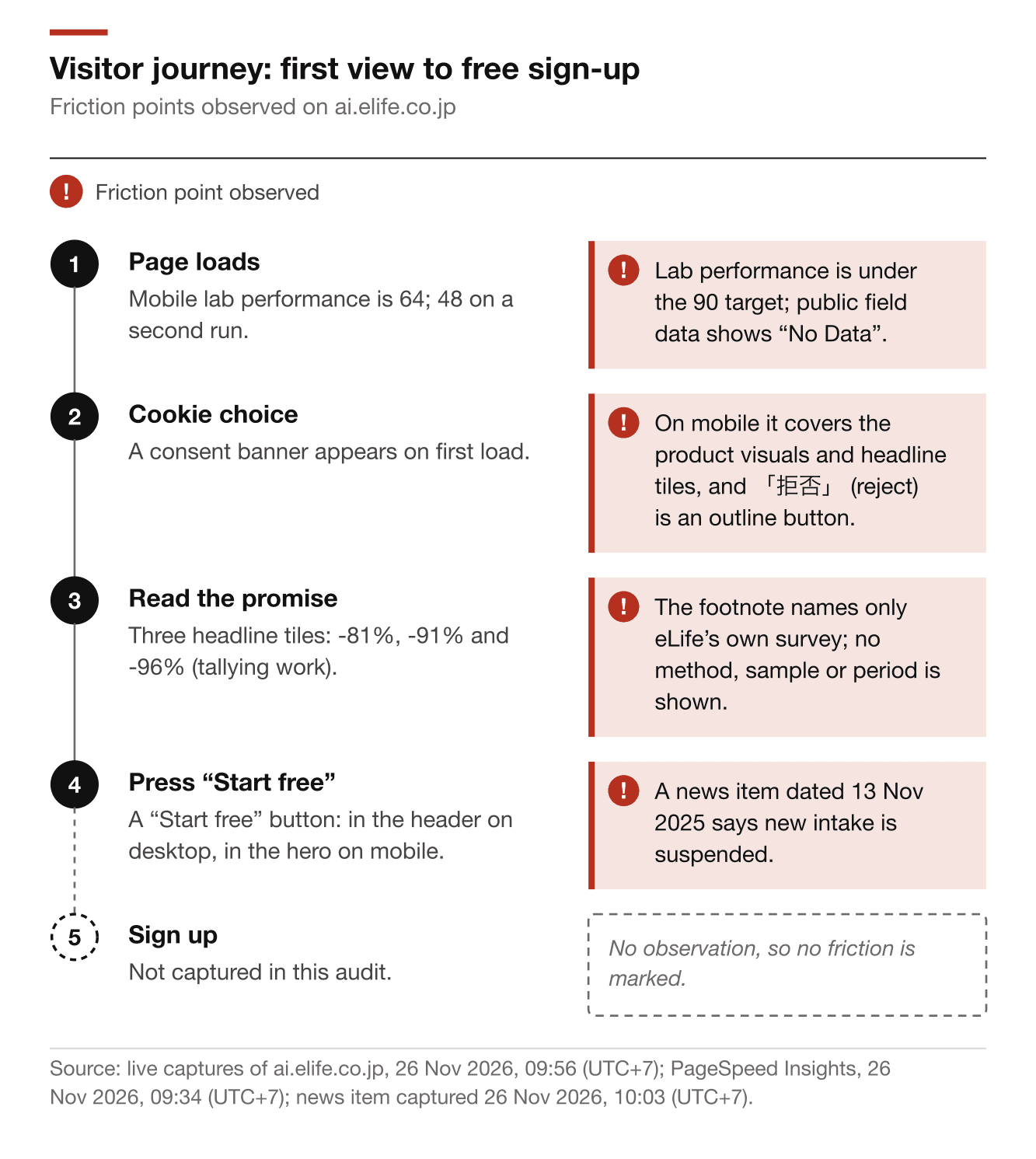
Figure. Five steps from first view to sign-up, with the friction observed at each. Source: ai.elife.co.jp captures, 26 November 2026.
Improvement, within 60 days. State the intended market in one line. If export markets matter, add an English summary page covering the promise, the method behind the figures, pricing and a contact. On the first screen, link visibly to the company behind the product, to the privacy approach, and to one or two named customer examples where clients agree. Effort: medium. Confidence: medium. This finding rests on what is absent from the captured screens, and pages I did not capture may already answer part of it.
The roadmap: seventeen actions over 30, 60 and 90 days
The actions follow from the findings across this series. Within each window they are ranked by effect first and then by effort. Effort and effect are my qualitative judgement, not a measurement. Owners are suggestions, and eLife will know better who should hold each one.
| # | Action | Suggested owner | Effort | Effect |
|---|---|---|---|---|
| First 30 days: make the page say one consistent, supported thing, and fix the settings | ||||
| 1 | Reconcile the intake notice with the "Start free" button | Product lead | Low | High |
| 2 | Show the basis of the headline figures | Marketing | Low | High |
| 3 | Set a first-load weight budget, starting with the two Japanese web fonts | Web team | Low | High |
| 4 | Make the mobile cookie banner compact and give reject the same weight as accept-all | Web team | Low | Medium |
| 5 | Complete the basic response headers on both sites; publish a security contact file | Web team | Low | Medium |
| 6 | Name one owner for vendor security notices, NVD and CISA KEV | IT | Low | Medium |
| By day 60: clean up what loads, for whom, and who owns it | ||||
| 7 | Build the tag inventory; make analytics and advertising tags follow the banner choice | Web team with marketing | Medium | High |
| 8 | Name one owner for tags and third-party services; consolidate and defer tags | Web team | Medium | High |
| 9 | Resolve the flagged accessibility and best-practice items | Web team | Low | Medium |
| 10 | Add a version source and an advisory channel to each inventory entry; review quarterly | IT with web team | Low | Medium |
| 11 | State the intended market; add an English summary if export matters; add trust links | Marketing | Medium | Medium |
| 12 | Move email authentication from monitoring to a stricter DMARC policy | IT | Medium | Medium |
| By day 90: make the page fast, prove it with real data, and watch it | ||||
| 13 | Bring mobile performance into the good band, as a median over several runs | Web team | High | High |
| 14 | Add real-user performance monitoring; report it monthly | Web team | Medium | Medium |
| 15 | Review edge caching on both sites; investigate the run-to-run spread | Web team | Medium | Medium |
| 16 | Set an observability and status-communication baseline | IT with customer support | Medium | Medium |
| 17 | Introduce a Content-Security-Policy in report-only mode, then switch it to blocking | Web team | Medium | Medium |
The dependencies that matter most run from the tag inventory. Actions 7 and 8 come before 13, because removing or deferring tags and fixing the fonts are likely the cheapest speed gains available, and before 17, because a content policy can only list what the inventory has found. Action 10 extends the same inventory, so it follows 7.
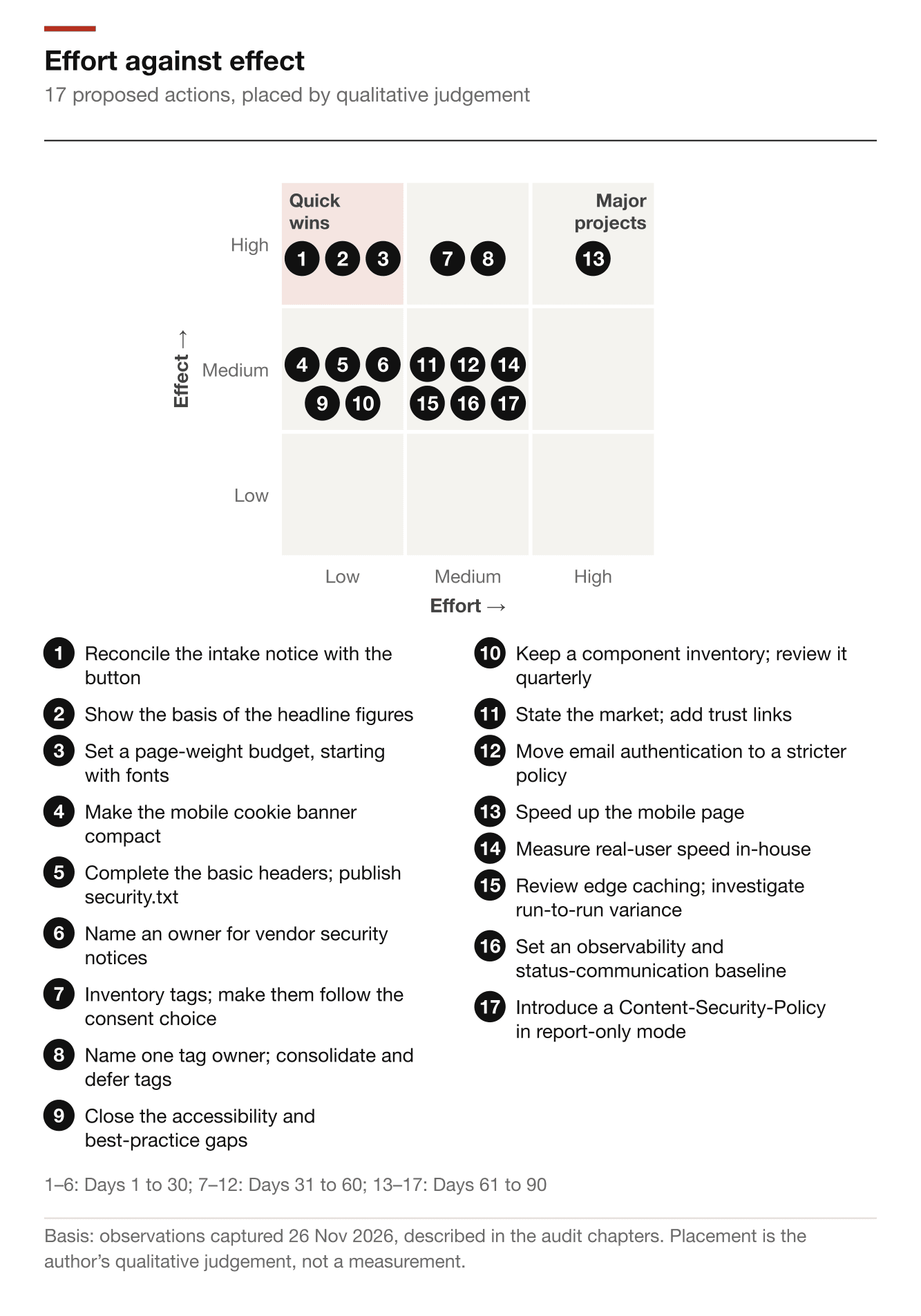
Figure. Each action placed by effort and effect. The placement is qualitative judgement.
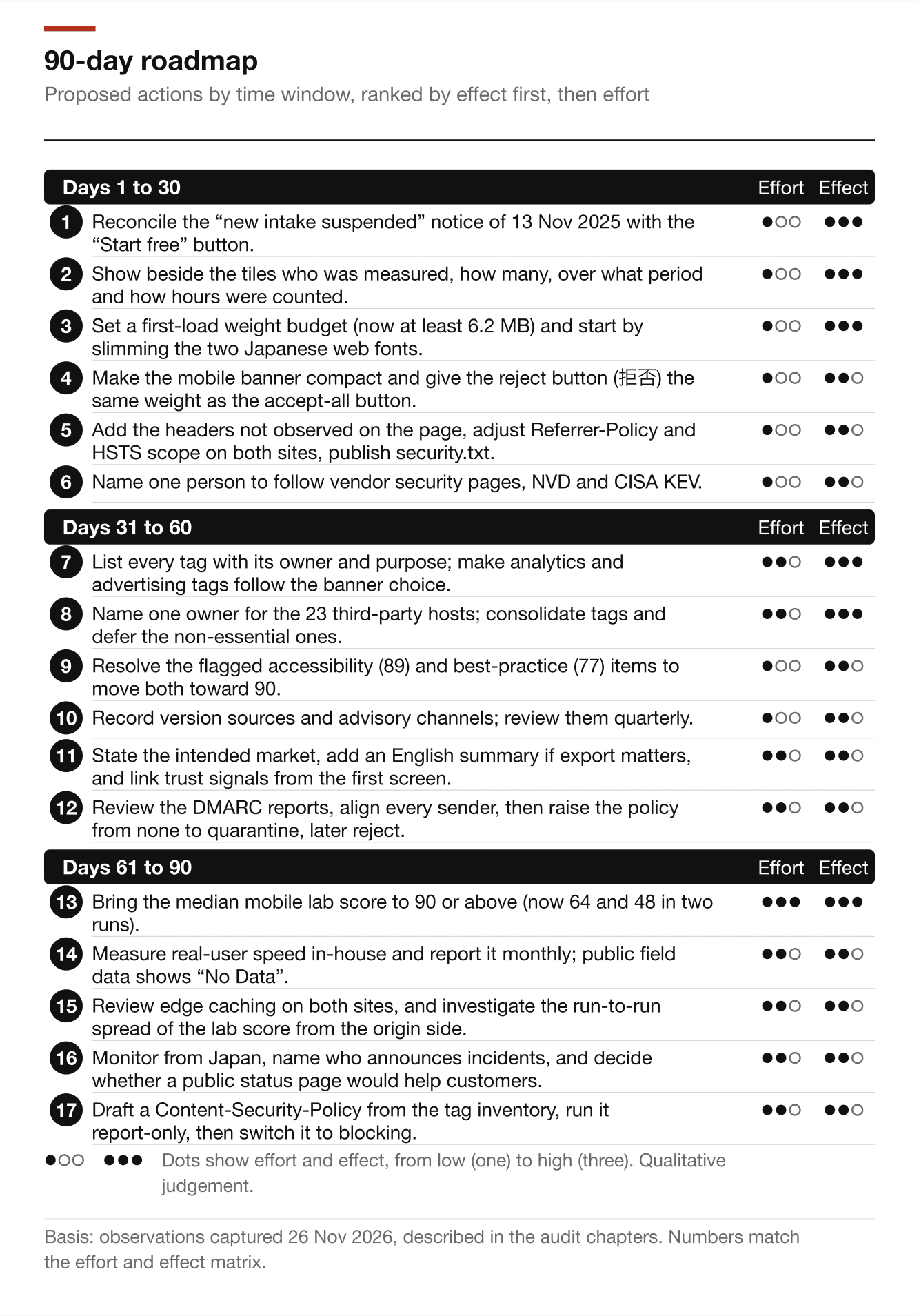
Figure. The seventeen actions by time window. Numbers match the effort and effect chart.
Where I may be wrong
- The survey may exist and be sound. I looked at one page. The method may be published elsewhere, and I make no judgement on the figures.
- Pages I did not capture may answer part of this: pricing, the sign-up flow, case studies, an English page.
- The intake notice may be stale on purpose, or intake may have reopened. The current state is for eLife to confirm.
- The captures are from 26 November 2026, and the page may have changed since.
- Effort and effect are my judgement, and owners are suggestions.
What would settle it
From eLife: which message about intake is current, and whether a method note for the figures exists. If eLife chooses to act on any of this, I would be glad to answer questions about how any observation was made. If it chooses not to, that is entirely eLife's decision, and this audit asks nothing further.
How to reach me
eLife Inc., or anyone acting for it, can reply to admin@infraloka.co.id or through the contact details on infraloka.co.id. If a finding here is wrong or out of date, I will correct it in writing.
Right of reply and correction policy
A substantive response may be published alongside this article, subject to reasonable editing for privacy, safety and relevance. If reliable evidence shows a factual statement here is wrong, I will correct it promptly and note the change.
Published by Rahmat Wibowo at InfraLoka: infraloka.co.id
#ProfessionalBlacklist #eLifeInc #SpecialEdition #WebsiteAudit